



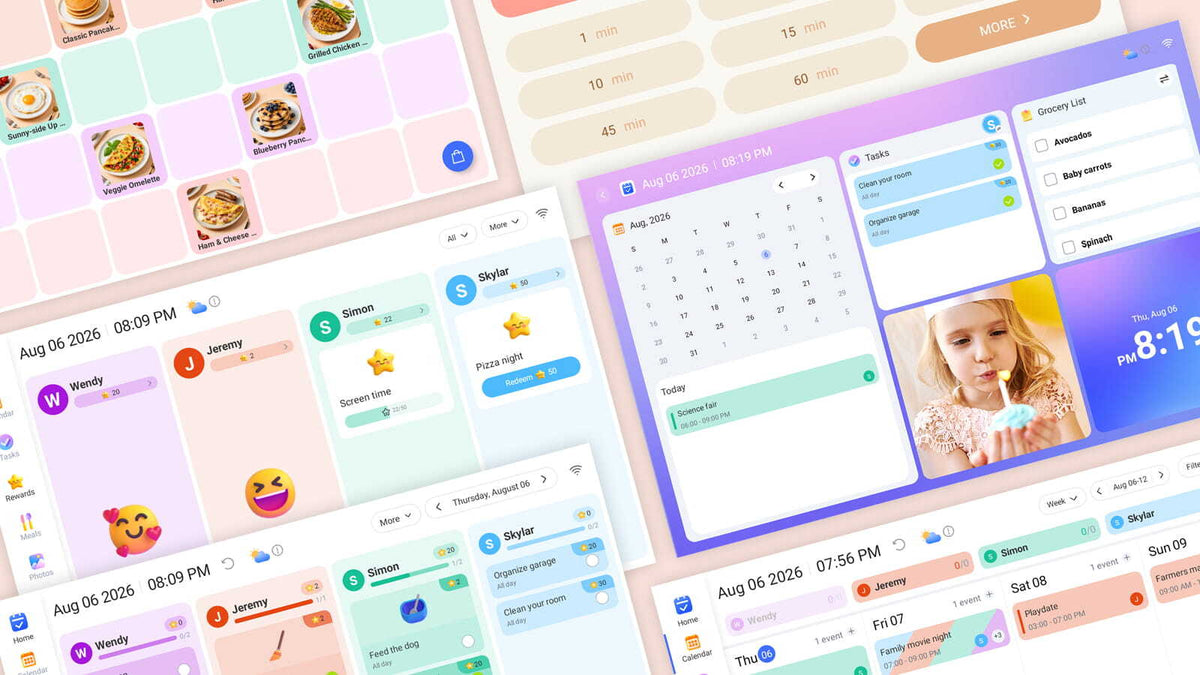
Big news for eCalendar frame owners: a brand-new software update has officially rolled out across all three of our frame sizes — 21.5", 15.6", and 10.1". If you own one, you'll see (or may have already seen) an update prompt on your device. Just tap to accept, let it install, and you're done — no other action needed. Once it completes, you'll unlock a completely refreshed look and a stack of powerful new features.
Let's walk through what's new.
A Whole New Home Screen
The old software didn't have a true home base — you jumped straight into whatever app you opened. The new eCalendar fixes that with a module-based Home screen that gives you a snapshot of your day at a glance: today's calendar events, tasks, lists, photos, time, date, and weather — all in one glanceable view the moment you wake the frame.

Icons With Personality
Small detail, big difference. The old sidebar used flat, monotone icons. The new menu icons are colorful, dimensional, and instantly recognizable — making it easier (and honestly more fun) to jump between Calendar, Tasks, Rewards, Meals, Lists, Photos, and Board.

Tasks: Reimagined
The old layouts got the job done, but they were plain. The new versions are laid out per family member with color-coded columns, progress bars, and emoji-based icons for chores, rewards, and list items — turning daily to-dos into something that actually feels approachable (yes, even for the kids).
The old task list was a flat checklist. The new version organizes tasks per family member in color-coded columns with emoji icons and star rewards attached to each chore.
Tasks Screen BEFORE:

Tasks Screen AFTER:

Rewards: Reimagined
Rewards now has two connected views — kids (or parents) can browse and set up a wishlist of rewards, then track live progress toward each one with star-based progress bars.
Rewards Screen BEFORE:

Rewards Screen AFTER:


Lists: Reimagined
The old list view was plain text entries. The new one adds colorful list cards (like Grocery List and To-Do List) with emoji headers and item counts.
Lists Screen BEFORE:

Lists Screen AFTER:

Meals You Can Actually Picture
The old Meals module was text-heavy and honestly a little hard to scan. The new one is fully visual — every planned meal shows up with a photo, organized by day and by Breakfast, Lunch, Dinner, and Snack. Meal planning at a glance, the way it should be.
Pictured Meals Screen BEFORE:

Pictured Meals Screen AFTER:

Brand-New Features
This update isn't just a redesign — it adds real new functionality:
🎉 Anniversary
Never let an important date sneak up on you. Record anniversaries, birthdays, and milestones, and keep a live countdown visible right on your calendar and lists.

🍳 Recipes
Store your family's favorite dishes for breakfast, lunch, and dinner — complete with nutrition info, servings, and ingredients. Build a new recipe from scratch and drop it straight into your Meals module for planning.


⏱️ Timer
A built-in Pomodoro and countdown timer with quick presets (1 to 60 minutes) — perfect for cooking, homework sessions, or keeping screen time in check.

😴 Sleep Mode
Set a recurring schedule to automatically power down the display overnight (or during quiet hours), and wake it back up with a single tap — no more glowing frame at 2 a.m.

🖊️ Board (15.6" and 21.5" versions only)
A digital scratchpad built right into the frame — perfect for quick notes, sketches, or leaving a message for the family.

No Action Needed — Just Enjoy It
This update has already been pushed to all three eCalendar frame sizes. If you haven't accepted the prompt yet, do so at your convenience — the whole process is quick, and you'll be up and running with the new look and features in minutes.
Don't have an eCalendar frame yet? Now's a great time to bring one home:
- 21.5" Smart WiFi Digital Calendar and Photo Frame
- 15.6" Smart WiFi Digital Calendar and Photo Frame
- 10.1" Smart WiFi Digital Calendar and Photo Frame
Our Commitment to You
Aluratek is committed to providing the best possible experience as you begin using your Smart WiFi Calendar Frame.
We understand that there may initially be questions about how this new display technology works, and our team is here to help you get the most from your purchase.
For additional questions regarding this article or your Aluratek product, please contact our support department.
Phone:
1-866-580-1978
Email:
support@aluratek.com
Share:
7 Reasons Shopping Direct at Aluratek.com Is Always the Smart Choice
Tech It Out: Hot Tip #12 — Go Wireless Anywhere with the Aluratek Bluetooth Audio Transmitter