



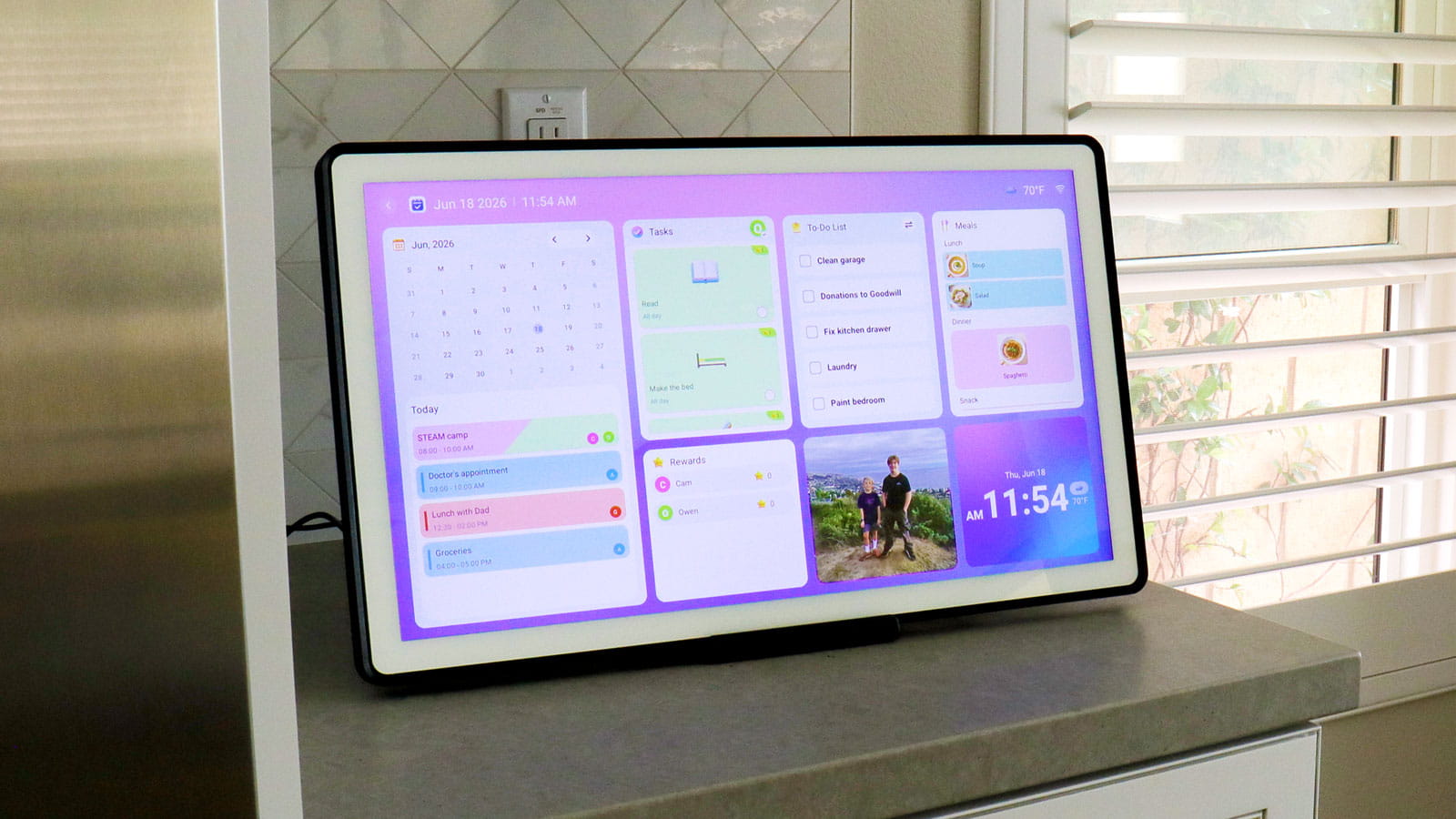

The smart display that keeps your household running just got a whole lot bigger.
If you've ever walked past a busy kitchen whiteboard covered in color-coded appointments, sticky-note reminders, and someone's half-erased soccer schedule — you already understand the problem Aluratek's eCalendar frames were built to solve. One central place. Everyone's schedule. Always visible.
But here's what makes these frames genuinely different from a smart display or a wall calendar app: when the schedule isn't front and center, they transform into a rotating digital photo frame — cycling through your family's favorite memories in crisp, vivid color. It's the rare household gadget that does two important jobs beautifully, and earns its counter or wall space every single day.
What started with two beloved sizes is now a complete family of three, with the brand-new 21.5" Smart WiFi Digital Calendar & Photo Frame joining the lineup. Whether you're outfitting a cozy apartment kitchen or a sprawling family living room, there's now an eCalendar frame built exactly for your space.
Let's take a look at what each model brings to the table — and how to figure out which one is right for your home.
 |
 |
What Every eCalendar Frame Has in Common
Before we dive into the size differences, it helps to know what you're getting no matter which model you choose. All three frames share the same core DNA:
The eCalendar app (free for iOS and Android) is the heart of the whole system. From your phone, you can sync Google, Apple, Yahoo, Outlook, and Cozi calendars, assign chores, create to-do lists, plan meals, upload photos and videos, and set reminders — all pushed wirelessly to the frame on your wall or counter.
No subscriptions, ever. There are no monthly fees hiding in the fine print. You buy the frame, download the free app, and you're good to go.
 |
 |
A kids' rewards program that actually motivates. Assign chores to every family member, let kids check them off right on the touchscreen, and watch them earn stars they can redeem for rewards you choose. It turns "did you do your chores?" into something they look forward to.
Dual-band WiFi (2.4GHz / 5GHz) means photos and videos upload fast, and the connection stays reliable even in busy households with a lot of devices competing for bandwidth.
A stunning digital photo frame — built right in. When the calendar isn't actively in use, every eCalendar frame doubles as a full-featured digital photo frame. Wirelessly send photos and videos straight from your phone using the eCalendar app, and they'll begin cycling on the display almost instantly. You can customize slideshow intervals and transition effects, and with 32GB of built-in memory, there's room for thousands of your favorite shots. From last summer's vacation to this morning's birthday breakfast — your best moments stay in view, right alongside the day's agenda.
A built-in light sensor that automatically dims or brightens the display based on the room's ambient lighting. The frame works for you in the background — you won't have to fiddle with brightness settings when the sun shifts in the afternoon.
Auto-rotation so whether you prefer your frame horizontal on the counter or vertical on the wall, your photos and calendar views always orient correctly.
The Three Models, Side by Side
10.1" — The Compact Organizer (AWFC10F)
The 10.1" model is the entry point into the eCalendar family, and for a lot of households, it's the perfect fit. It's compact enough to tuck into a corner of the kitchen counter, on a home office desk, or on a nightstand — anywhere you want a personal scheduling hub without taking over the room.
At 1280 × 800 resolution with a 16:10 aspect ratio , the display is crisp and readable. The removable stand lets you flip between landscape and portrait viewing in seconds, and the frame can also be wall-mounted if you prefer it out of the way entirely.
Best for: Smaller households, home offices, dorm rooms, or anyone who wants an eCalendar frame in a secondary space like a bedroom or home gym.
15.6" — The Family Sweet Spot (AWFC15F)
Step up to the 15.6" and things open up considerably. This is the model that tends to anchor a kitchen or living room — big enough for everyone in the house to read the day's schedule at a glance, but not so large that it dominates the space.
The 1920 × 1080 Full HD resolution at a 16:9 aspect ratio means photos look genuinely stunning here. Videos play smoothly. And with a larger canvas, the calendar view shows more events without feeling crowded.
It includes a stand plus wall mount hardware in the box, so you have flexibility from day one.
Best for: Families with kids, busy households with multiple schedules to track, or anyone who wants the frame to be the focal point of a shared family space.
21.5" — The Big Screen Command Center (AWFC21F) 🆕
This is the one that changes the conversation. At 21.5" with a 1920 × 1080 Full HD IPS touchscreen , the newest member of the eCalendar family is in a different category of presence. This isn't just a frame you glance at — it's a display that genuinely transforms the room it's in.
The larger screen makes everything more accessible. Kids can read it without squinting. Grandparents can see it from across the kitchen. And when you're juggling five family members' calendars, a meal plan, a chore chart, and a photo slideshow — having that much real estate to work with makes everything feel less cluttered and more manageable.
At 6.81 lbs , it's substantial enough to feel like a real household fixture, and the included metal easel stand gives it a premium, gallery-quality look on a counter or sideboard. Wall mounting is also fully supported with the included mount and screws — and for a frame this size, mounting it at a central height that works for all family members (kids included) is worth the extra ten minutes.
One practical note: the 21.5" model is particularly well-suited to households where the frame needs to serve multiple generations. Whether it's mounted in a hallway so everyone sees it on the way out the door, or placed on a kitchen island where it becomes the natural gathering point — visibility and accessibility are genuinely improved at this size.
Best for: Larger families, open-concept living spaces, households that want the frame to function as a true household command center, or anyone who's been wanting an eCalendar frame but needed it to be bigger .
Full Comparison Chart
| 10.1" AWFC10F | 15.6" AWFC15F | 21.5" AWFC21F (New!) | |
|---|---|---|---|
| Price | $149.99 | $269.99 | $349.99 |
| Display Size | 10.1" | 15.6" | 21.5" |
| Resolution | 1280 × 800 | 1920 × 1080 | 1920 × 1080 |
| Aspect Ratio | 16:10 | 16:9 | 16:9 |
| Display Type | IPS LCD Touchscreen | IPS LCD Touchscreen | IPS LCD Touchscreen |
| Built-in Memory | 32GB | 32GB | 32GB |
| WiFi | Dual-band 2.4/5GHz | Dual-band 2.4/5GHz | Dual-band 2.4/5GHz |
| Calendar Sync | Google, Apple, Yahoo, Outlook, Cozi | Google, Apple, Yahoo, Outlook, Cozi | Google, Apple, Yahoo, Outlook, Cozi |
| eCalendar App | iOS & Android | iOS & Android | iOS & Android |
| Chore / Rewards Program | ✅ | ✅ | ✅ |
| Meal Planning & To-Do Lists | ✅ | ✅ | ✅ |
| Automated Reminders | ✅ | ✅ | ✅ |
| Wireless Photo & Video Sharing | ✅ | ✅ | ✅ |
| Light Sensor | ✅ | ✅ | ✅ |
| Auto-Rotation | ✅ | ✅ | ✅ |
| Stand Included | ✅ | ✅ | ✅ |
| Wall Mount Included | ✅ | ✅ | ✅ |
| Subscription Required | ❌ None | ❌ None | ❌ None |
| Dimensions | 10.5" × 7.25" × 0.6" | 15.75” x 9.8” x 1” | 20.5" × 12.37" × 1.37" |
| Weight | 1.6 lbs | 3.8 lbs | 6.81 lbs |
| Warranty | 1 Year | 1 Year | 1 Year |
Which Size Is Right for You?
Still deciding? Here's a simple way to think about it:
- Choose the 10.1" if you want a personal organizer for one space — a desk, a bedside table, or a small kitchen. It's nimble, affordable, and does everything the bigger models do.
- Choose the 15.6" if you want the classic family command center. It's the sweet spot for most households — big enough to be genuinely useful, sized right for a standard kitchen counter or wall space.
- Choose the 21.5" if you have the wall space or counter space for it and want the frame to be unmissable. For larger families, open floor plans, or anyone whose household has been struggling to see the 10" or 15" from across the room — this is the upgrade worth making.
🎉 Launch Special $50 Off: July 6–12
The new 21.5" eCalendar frame is launching with a special promotional $50 off offer running July 6–12. Stay tuned to aluratek.com and our social channels for details — it's a great opportunity to get the newest (and biggest) member of the family at a special introductory price.
All three eCalendar frames are available at aluratek.com . The eCalendar app is free to download on the App Store and Google Play.
Our Commitment to You
Aluratek is committed to providing the best experience for your new 21.5", 15.6" or 10.1" Smart WiFi Digital Calendar and Photo Frames . As questions arise, we’ll share updates via blogs, videos, and social media. We understand that new technology can take time to learn — and we’re here to help.
For further assistance, please contact our support department:
Phone:
1-866-580-1978
Email:
support@aluratek.com
Share:
Father’s Day Gift Guide: Tech Gifts Dad Will Actually Use
Level Up Your Workspace — Desktop & Mobile Edition